
If you already keep a list of your dogs in a spreadsheet, you can bring them all in at once. You match your columns, check every row, and nothing is saved until you press Import.
What you can import
- A CSV file saved from Excel, Google Sheets or Numbers, up to 2 MB and 2,000 rows.
- Or rows copied and pasted straight from your spreadsheet.
Excel's own .xlsx files can't be read directly. In Excel, choose File, then Save As, and pick CSV. In Google Sheets, choose File, Download, then Comma-separated values. Or just copy the rows and paste them.
The first row must hold your column names, such as Name, Sex and Date of birth.
The columns we recognise
We match your columns by their names. These are the details you can import, and the column names that match each one. Capitals and punctuation don't matter.
| Detail | Column names we recognise |
|---|---|
| Name (required) | “call name”, “callname”, “name”, “nickname”, “pet name”, “call” |
| Registered name | “registered name”, “registered”, “reg name”, “registration name”, “full name” |
| Sex (required) | “sex”, “gender” |
| Date of birth | “dob”, “date of birth”, “birth date”, “birthdate”, “born”, “birthday”, “whelped” |
| Color | “color”, “colour”, “coat”, “coat color”, “markings” |
| Breed | “breed” |
| Titles | “titles”, “title”, “awards” |
| Sire | “sire”, “sire name”, “father”, “dad” |
| Dam | “dam”, “dam name”, “mother”, “mom” |
Your columns don't have to use these exact names. You can match any column to any detail yourself in the next step. Columns you don't match are simply not imported.
Import your dogs
- Choose Dogs in the sidebar, then Import.
- Choose your CSV file, or paste your rows and press Continue.
- Match your columns. Each detail shows the column we guessed for it, marked Our guess. Change any that are wrong, or choose Not matched. Details marked (required) must be matched before you can go on.
- Press Review.
- Check every row. Every row is shown as it will be imported. You can fix any cell right there.
- Press Import.
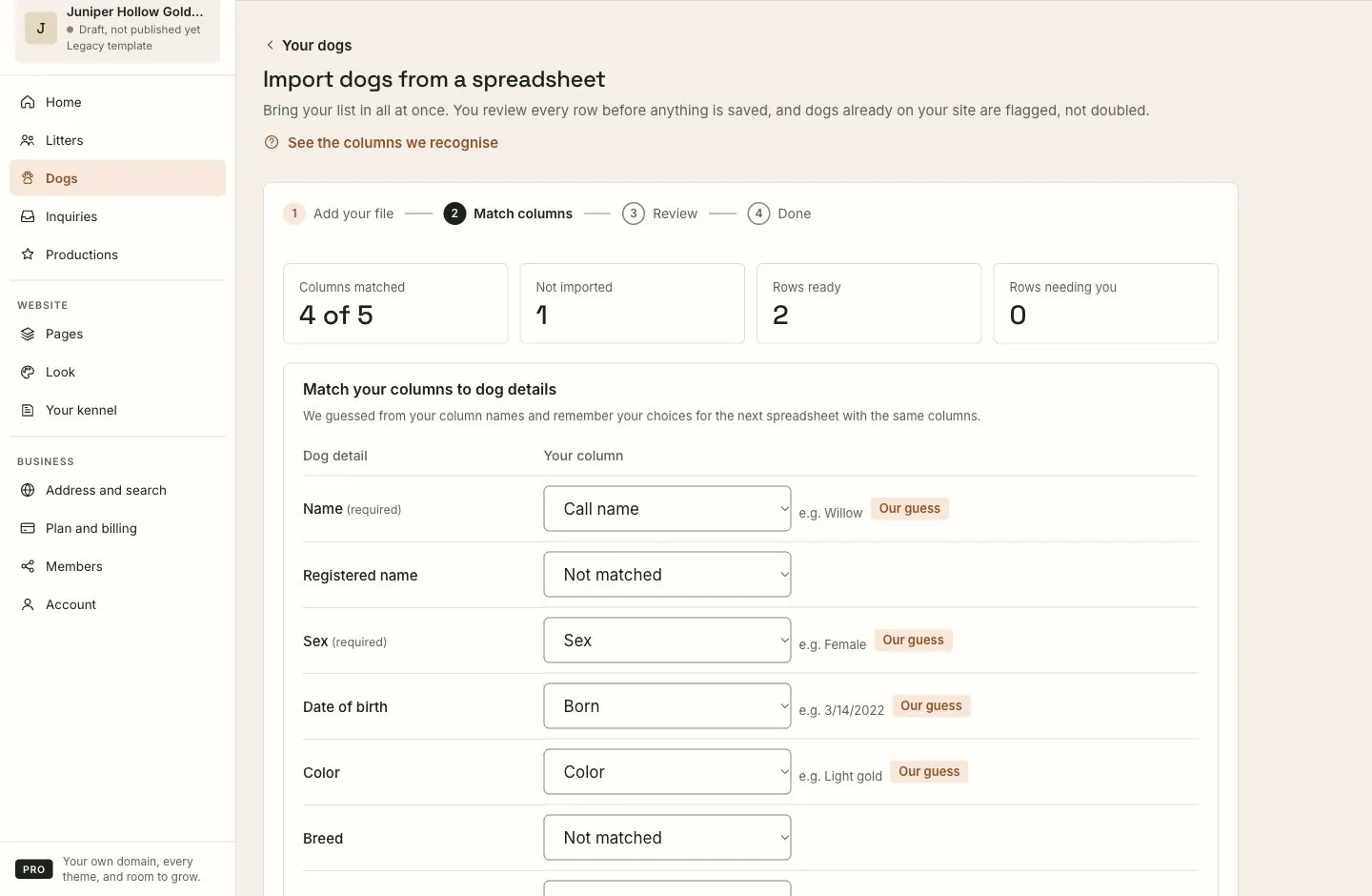
We remember how you matched your columns in this browser, so the next spreadsheet with the same columns is matched for you.
Reading your rows
- Sex can be written as Male or Female, M or F, and other common words, including the words for males and females used for your dogs.
- Dates can be written like 2022-04-15, 4/15/2022 or 15.04.2022. Dates with slashes are read month first, the US way, so 04/05/2022 is April 5.
- Sire and dam names become the first generation of each new dog's pedigree. See Pedigrees.
- If a row has no breed, your website's breed is used.
Dogs already on your website
We look for each row among your dogs: by registered name, or by name when one of them has no registered name. A match is marked Looks like that dog, and you choose what happens:
- Skip: leave it out. This is chosen for you, so nothing is doubled by accident.
- Update it: fill in details that are empty on your website. Anything already there is kept.
- Add anyway: add it as a new dog.
Your plan's limit
The Free plan includes 5 dogs; see Plans and billing. If your spreadsheet has more new dogs than your plan has room for, the review step tells you before you import: the first ones are added, up to your limit, and the rest are left out. Updates to dogs already on your website still go through.
What to expect
- Nothing is saved until you press Import.
- When it finishes, you see how many dogs were added and updated, and how many didn't fit your plan.
- Imported dogs are saved straight away, and listed under Dogs. Open each one to add photos and more details.
If something goes wrong
- "That file is over 2 MB." Split the spreadsheet into two files, or copy and paste the rows instead.
- "That’s … rows." Import up to 2,000 at a time. Split the list.
- "We need a header row and at least one row of data." Make sure the first row holds your column names.
- A row is marked Fix. It has a problem, such as no name, or a sex or date we can't read. The row says what's wrong; fix it in place. Rows marked Fix are skipped until they're fixed.
- "… isn’t a sex we recognize." Change the value to Male or Female, in the row or in your spreadsheet.
- "… isn’t a date we can read." Day-first dates written with slashes, like 15/04/2022, can't be read. Use 04/15/2022, dots (15.04.2022) or the 2022-04-15 form.
- Some rows didn't fit your plan. Your plan's limit was reached. Upgrade, or remove dogs you no longer need to show, then import the rest.
Still stuck? Contact support and tell us what the first row of your spreadsheet says.