
Your website is on the Free plan, which stays free with no trial that runs out, or on Pro, at $39 a month or $390 a year. This guide covers what each includes, how to change plans, and what happens to your website when you do.
What each plan includes
| Free | Pro | |
|---|---|---|
| Price | Free | $39/month |
| Dog profiles | 5 profiles | Unlimited profiles |
| Active litters | 1 litter | Unlimited litters |
| Photos | 60 photos | Unlimited photos |
| Custom pages | Not included | Unlimited custom pages |
| Arrange your About, Contact, dogs and litters pages | Not included | Included |
| Productions | 12 productions | Unlimited productions |
| Website drafted with help | One draft | One draft, plus 3 new versions |
| Pedigrees read with help | 10 a month | 50 a month |
| Your own domain | Not included | Included |
| Templates | 4 templates | Every template |
| Remove the badge | Not included | Included |
| Search engine basics | Included | Included |
| Support | Self-serve guides | Email support |
These are the same figures the editor enforces, so what you see here is what your website gets.
See your plan
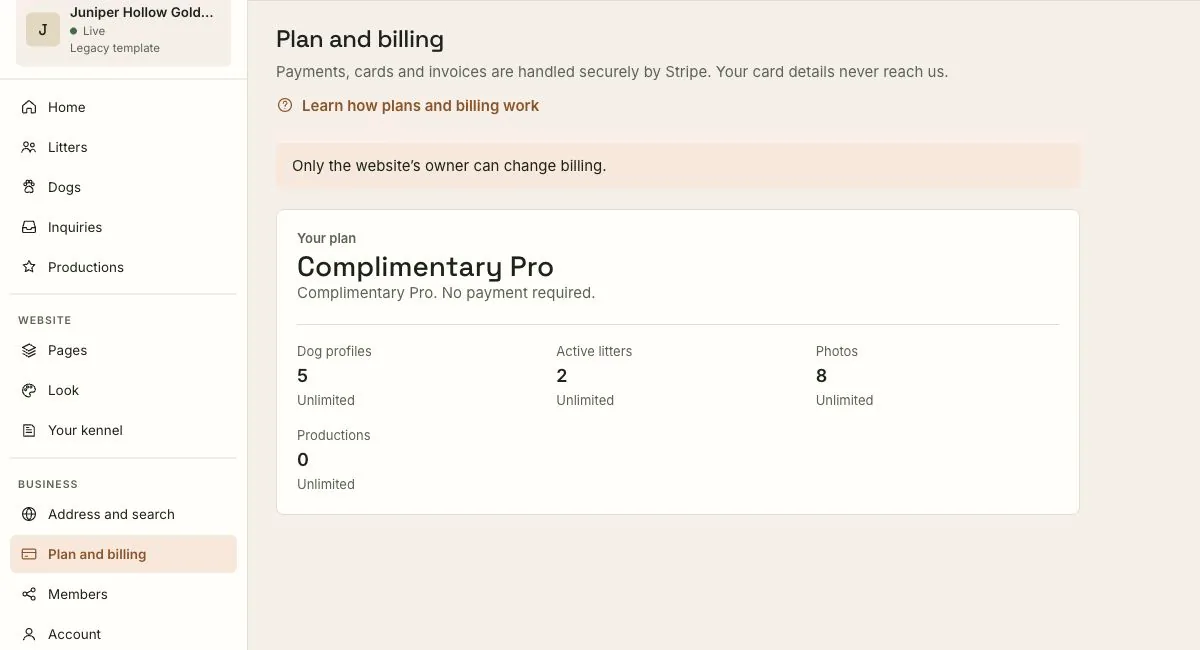
Choose Plan and billing in the sidebar. It shows:
- Your plan, and when it renews or ends.
- How much of your plan you're using: dog profiles, active litters, photos and productions.
- The comparison above, and a way to upgrade.
Only owners can change billing. See Inviting owners and editors.
Upgrade your plan
- On Plan and billing, choose Monthly or Yearly. Paying yearly saves 17%.
- Press Upgrade to Pro. You go to Stripe, our payment provider, to pay. Your card details never reach us.
- Have a promotion code? Add it at checkout.
- When you come back, the screen confirms your payment and says you're on Pro.
Everything Pro includes is available straight away.
If the screen says upgrades aren't open yet, the button isn't available. The screen tells you how to get Pro in the meantime.
Manage your card, invoices and cancelling
Press Manage Billing on the Plan and billing screen. It opens Stripe's billing page, where you update your card, see your invoices, and cancel.
Cancelling takes effect at the end of the period you've paid for. Until then you keep everything Pro includes, and the screen shows the date your plan ends.
When your paid plan ends
Nothing is deleted. When your website moves to Free:
- Your most recent dogs and litters stay on your website, up to the Free plan's limits. The rest are kept, just taken off your website, and come back if you return to Pro.
- Your own domain is paused, and your free address keeps working. Return to Pro and your domain switches back on, with no DNS changes. See Connecting your own domain.
- Your website stays online. The Free plan never expires.
If a payment fails
If we can't charge your card, you stay on Pro while Stripe tries again. The Plan and billing screen shows Update Card. Update your card there and Stripe retries the payment.
Draft my website and pedigree readings
Two helpers come with a set amount on each plan, shown in the table above:
- Website drafted with help counts every draft and every new version of a section. It doesn't reset. See Draft my website.
- Pedigrees read with help is counted per calendar month. See Pedigrees.
Both are shared by everyone who works on your website.
Have us set it up for you
Rather not set it up yourself? Done-for-you setup is a one-time $149: we build your website from your existing one, then hand it over to you. Choose Book Setup on the Plan and billing screen, and we'll email you to start.
What to expect
- Prices are in US dollars.
- Upgrading is immediate. Cancelling waits until the end of the period you paid for.
- Going back to Free never deletes anything. What doesn't fit is kept, off your website, until you return.
If something goes wrong
- "Only the website's owner can change billing." Ask an owner to make the change, or to make you an owner.
- The screen still shows Free after paying. Payments can take a moment to confirm. Press Refresh. If it still hasn't changed after a few minutes, contact support with the email on your receipt.
- "We couldn’t charge your card." Press Update Card and add a card that works. Your plan stays active while Stripe retries.
- You hit a limit. The editor tells you which limit, and on Free offers Pro. You can also make room, for example by removing photos you no longer use.
Still stuck? Contact support and tell us the email address on your account.